BreakWave EA
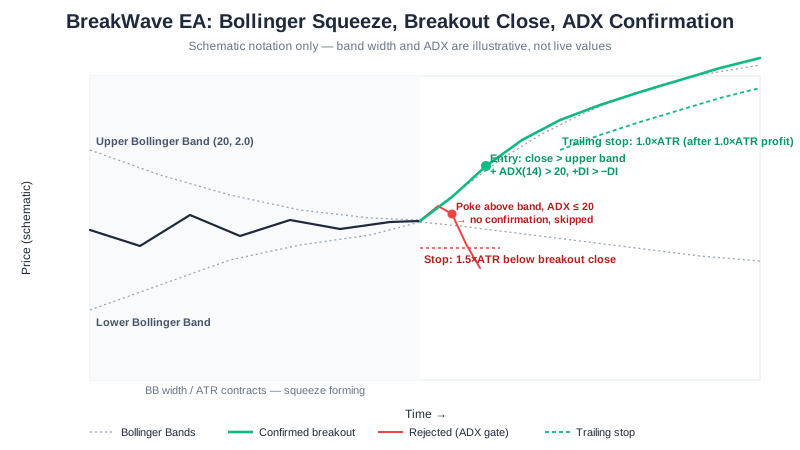
Most EAs in this suite either ride a trend or fade a range. BreakWave is built for the narrow moment in between: it watches Bollinger Band width contract into a squeeze, then waits for price to close outside the bands while ADX confirms that a real trend — not a false spike — is forming behind the move. That combination of a volatility trigger and a trend-strength gate is what separates it from a plain “price broke the range” system.
BreakWave is free to download for MetaTrader 4 and MetaTrader 5, one of several distinct types of automated trading algorithms we publish. Underneath the squeeze-and-confirm logic sit ATR-based dynamic stops and a trailing exit, so the position sizing adapts to whatever volatility regime the breakout happens in.
Developer disclosure: We built BreakWave. This page is our own technical assessment, not an independent third-party review. We do not yet publish a measured backtest table for BreakWave — the diagram above is a rule-based schematic of the entry/exit logic, not a profit result. See our backtest methodology and results for the EAs we do have tested figures for, including the July 30, 2026 correction to our testing pipeline. Demo-test BreakWave for several weeks before running it live.
What Is Breakout Trading?
A breakout occurs when price escapes a defined range or volatility envelope with momentum. Breakout traders enter as the range fails, betting that the energy released by the breakout carries price meaningfully further before the next consolidation. The trade-off is asymmetric: the failed-range level becomes a tight stop, while a successful breakout can deliver a multi-ATR move before the next pause — but false breakouts (a spike outside the range that immediately reverses) are the main way this style loses.
How It Works
- Squeeze detection — Monitors Bollinger Band width relative to ATR to identify periods of unusually low volatility
- Breakout confirmation — Waits for price to close outside the Bollinger Bands while ADX confirms a developing trend
- Directional filter — Uses +DI/−DI crossover to confirm the breakout direction matches the close-outside-bands side
- Dynamic exits — Sets ATR-based stop and target, then trails the stop to lock in profits
Entry Conditions
Buy signal:
- Bollinger Band width / ATR ratio is below the squeeze threshold (compression detected)
- Current candle closes above the upper Bollinger Band
- ADX is above 20 and +DI > −DI (trend strength + bullish direction)
Sell signal:
- Bollinger Band width / ATR ratio is below the squeeze threshold
- Current candle closes below the lower Bollinger Band
- ADX is above 20 and −DI > +DI (trend strength + bearish direction)
Key Features
| Feature | Details |
|---|---|
| Strategy | Bollinger Bands squeeze breakout |
| Timeframe | H1 (recommended) |
| Pairs | EURUSD, GBPUSD, USDJPY |
| Indicators | Bollinger Bands (20, 2.0), ADX (14), ATR (14) |
| Risk per trade | 2% (configurable) |
| Stop-loss | 1.5× ATR (dynamic) |
| Take-profit | 2.0× ATR (≈ 1:1.33 R:R) |
| Trailing stop | 1.0× ATR (activates after 1.0× ATR profit) |
| Platform | MetaTrader 4 and MetaTrader 5 |
| Price | Free |
Configuration
| Parameter | Default | Range | Description |
|---|---|---|---|
| RiskPercent | 2.0 | 0.5–5.0 | Account % risked per trade |
| BB_Period | 20 | 14–30 | Bollinger Bands lookback |
| BB_Deviation | 2.0 | 1.5–2.5 | Bollinger Bands standard deviations |
| SqueezeRatio | 0.5 | 0.3–0.8 | BB width / ATR ratio to flag squeeze |
| ADX_Period | 14 | 10–20 | ADX lookback |
| ADX_Threshold | 20 | 15–30 | Minimum ADX to confirm breakout |
| SL_ATR_Multi | 1.5 | 1.0–2.5 | Stop-loss as ATR multiple |
| TP_ATR_Multi | 2.0 | 1.5–3.5 | Take-profit as ATR multiple |
| TrailATR | 1.0 | 0.5–2.0 | Trailing stop ATR distance |
Risk Controls (Built In)
These settings limit how much a single configuration can lose; they do not make automated trading safe.
- ATR-based stops — Stop-loss and take-profit adapt to current market volatility
- Trailing stop — Locks in profits as the breakout extends
- ADX gate — No entries unless trend strength confirms (avoids false breakouts)
- Squeeze prerequisite — Only trades after compression, not random closes outside the bands
- Position limit — Max 3 concurrent open trades
- Daily trade limit — Max 5 entries per day to prevent overtrading
- Automatic lot sizing — Position size derived from account balance × risk %
Best Pairs, Timeframes, and Account Size
- Timeframe: H1 — long enough for squeezes to form, short enough for several setups per week
- Pairs: EUR/USD, GBP/USD — clean breakout behavior with tight spreads
- Avoid: Sustained-trend pairs without consolidation phases (for example currencies in central-bank divergence cycles, where price rarely sits still)
- Accounts: $500+ balance is where the default risk settings size cleanly
| Account size | RiskPercent | SqueezeRatio | ADX_Threshold | MaxTrades |
|---|---|---|---|---|
| $200 – $500 | 1.0 | 0.6 | 25 | 2 |
| $500 – $2,000 | 2.0 | 0.5 | 20 | 3 |
| $2,000 – $10,000 | 2.0 | 0.5 | 20 | 3 |
| $10,000+ | 1.5 | 0.45 | 18 | 4 |
Smaller accounts use stricter filters (higher squeeze ratio and ADX threshold) to trade less often but with higher conviction. Larger accounts can afford a slightly looser filter and more breakouts.
Strengths and Risks
Strengths
- Catches the biggest moves of the week — breakouts typically produce the largest single-trade ranges
- The ADX filter cuts out most false breakouts that plague naive squeeze EAs
- Sits flat (no losses) during quiet markets — patience is built in
- Asymmetric payoff: a small ATR stop vs. multi-ATR runs when the breakout sticks
Risks
- False breakouts still occur — price escapes the bands, hits the ADX threshold, then immediately reverses
- Long flat periods between breakouts can feel like the EA is “broken” (it isn’t — that’s the design)
- News-driven gaps can blow through the ATR stop on illiquid pairs
- Lower trade frequency means equity grows in steps rather than smoothly
Getting Started
- Open a free XM account if you don’t have one
- Fund it with $200 or more — the minimum the EAs are designed for (deposit walkthrough)
- Register your account to activate the EA
- Download BreakWave EA (both MT4 .ex4 and MT5 .ex5 are provided)
- Install on MetaTrader following our step-by-step guide
- Attach to an H1 chart of EURUSD or GBPUSD and confirm “AutoTrading” is enabled
How BreakWave Compares to Our Other EAs
| SteadyPips | GridMaster | BreakWave | TripleAlign | |
|---|---|---|---|---|
| Style | EMA trend | Grid trading | Breakout | Multi-EMA trend |
| Best market | Trending | Ranging | Range → breakout | Strong trends |
| Entry logic | EMA crossover | Fixed grid levels | BB squeeze + ADX | Triple EMA + ADX |
| Risk:reward | 1:1.33 | Variable | 1:1.33 | 1:2 |
| Trade frequency | 3–8 / week | Continuous | 2–5 / week | 1–3 / week |
Frequently Asked Questions
What makes BreakWave different from a plain range-breakout script? Most breakout scripts fire the moment price crosses a range boundary, which is exactly how they get caught by false breakouts. BreakWave requires two independent things to line up first: a genuine Bollinger Band squeeze (BB width contracting below the SqueezeRatio threshold) and an ADX reading above 20 confirming trend strength in the same direction as the close. SteadyPips (trend) and GridMaster (range) sit on either side of that transition; BreakWave is built specifically for the moment between them.
Can I run BreakWave on the same account as SteadyPips or GridMaster? Yes, on different charts. Each EA in the SteadyPips suite uses a unique magic number (BreakWave defaults to 88801) so order tracking never conflicts — but running several EAs at once also multiplies the capital at risk across separate charts, so size each one’s RiskPercent with the others in mind rather than treating them as independent full-risk allocations.
What happens during long stretches of low volatility? BreakWave waits patiently — by design. The squeeze detection only fires when volatility first contracts and then expands, so quiet weeks may produce zero trades. That’s the SqueezeRatio and BB_Period settings doing exactly what they’re configured to do, not the EA malfunctioning.
Why does BreakWave sometimes go a week or two without a single trade? On H1 you can expect roughly 2–5 trades per week per pair, but breakouts don’t happen on a schedule — some weeks a genuine squeeze-then-expansion setup simply doesn’t occur. Lower frequency is the trade-off for the ADX filter cutting out most false breakouts that a looser breakout EA would take.
Is BreakWave AI-powered? No. BreakWave is a rule-based algorithm, not AI or machine learning — every entry and exit follows fixed conditions on three published indicators (Bollinger Bands, ADX, ATR). There is no model that trains on data or adapts its own rules; the same inputs always produce the same signal, which is also why it can be backtested and audited line by line.
How does BreakWave handle a breakout that immediately fails? It doesn’t try to predict a false breakout in advance — the ADX(14) above 20 requirement filters out most of them before entry, but some still get through. When one does, the 1.5×ATR stop-loss closes the trade at a known, bounded loss; there is no averaging in or widening the stop to wait it out. False breakouts are the main way this style loses, which is why the stop is fixed at entry, not adjusted afterward.
Further Reading
- Technical Analysis Basics — BB, ADX, and ATR fundamentals
- Forex Trading Sessions — why breakouts cluster at session opens
- How to Install an EA on MetaTrader — step-by-step setup
- How to Backtest a Forex EA — validate settings before going live
- VPS for Forex Trading — keep the EA running 24/7
- SteadyPips EA — compare with our simpler trend-following EA
Breakout trading involves significant risk, including the possibility of false breakouts. Past performance is not indicative of future results. Please read our risk disclosure before trading.
Affiliate Disclosure: This page contains affiliate links to XM. We receive a commission when you open an account through our links, at no additional cost to you. Full disclosure