Why This Guide Exists
Opening an XM account takes five minutes — but an account with no balance can’t trade, and an EA attached to it does nothing. This guide walks through funding your account so your Expert Advisor can actually run, and it starts with withdrawal on purpose: the deposit method you pick now decides how you get money back out later.
If you don’t have an account yet, open a free XM account here first, then come back.
Before You Deposit: A Four-Item Checklist
Work through these in order, before you send any money. Skipping ahead is the most common way readers end up funding an account in a way they regret.
- Decide your deposit method with withdrawal in mind, not just convenience today. Anti-money-laundering rules require withdrawals to return via the same method used to deposit, up to the amount deposited, before any remaining profit can go elsewhere — funds sent in by card are refunded to that card first; only profit beyond the original deposit can move to a bank account. Why does this belong before you’ve even deposited? Because the rule is decided the moment you choose a funding method, not when you later ask to withdraw — depositing by card when you’d rather withdraw to a bank account creates a problem you can’t fix after the fact.
- Complete verification first. A government-issued ID and a proof of address (a utility bill or bank statement, usually dated within the last three months) are required before withdrawals process, and an unverified account can have deposits delayed or held. Submit both before you deposit, not after.
- Match your account’s base currency to the currency you’ll actually fund it with. XM lets you open an account in several base currencies. If you fund it with a currency that doesn’t match — say, a EUR card funding a USD account — the conversion happens automatically, but it isn’t free: your card network or bank applies its own conversion spread on top of whatever XM charges, and you pay that spread again in reverse on withdrawal. Opening the account in the currency you’ll deposit and withdraw with most often avoids paying it twice. It also changes what a pip is worth in your terms — pip value figures like the $0.10-per-pip number used throughout our EA guides assume a USD-quoted pair on a USD account; a JPY or EUR account converts the same price move to a different number of your account currency’s units. See lot sizes explained for how that changes position sizing.
- Decide your deposit amount using the sizing table below, not the platform’s $5 technical minimum. That number gets your account open; it is not enough to run an EA properly, for reasons the next section spells out.
Processing times and documents (as published by XM, July 2026): e-wallet and card withdrawals are typically processed within 1 business day of the request, with the receiving provider adding its own time on top; bank wire withdrawals typically take 3–5 business days.
How Much Should You Deposit? Sizing Checklist
XM’s technical minimum is $5 (as published by XM, July 2026). For the full arithmetic behind why that isn’t a practical minimum — lot-size floors, drawdown headroom, and what actually changes between $5 and $200 — see minimum deposit forex brokers: what $5-$100 really gets you.
Our EAs size positions from your balance with a fixed risk percentage (typically 1–2% per trade) and ATR-based stop distances. On a balance under $200, the computed lot size falls below the 0.01 minimum lot, which forces one of two bad outcomes: the EA either skips trades entirely or trades the minimum lot at an effective risk far above the intended percentage. Plug your own intended deposit into the position-size calculator to see exactly where that floor lands for you.
| Balance | What it means for an EA | Deposit if this describes you |
|---|---|---|
| Under $200 | Position sizing breaks down — not recommended | Don’t fund an EA yet; use a demo account instead |
| $200–$500 | Workable minimum: conservative settings, 0.01 lots, single EA | You want to start small and prove the process works |
| $500–$2,000 | Comfortable: proper 1–2% risk sizing, room for drawdowns | You’ve already run a demo and want realistic sizing |
| $2,000+ | Full flexibility, can run more than one EA | You’re funding a second EA or account tier |
The reason for headroom is drawdown, not bigger bets. Every strategy has losing streaks; a balance cushion lets the EA keep sizing correctly through them. This is also why our GridMaster setup guide uses the same $200 floor for its smallest preset — below it, position sizing breaks down regardless of which EA you run. See our risk management guide for the math, and our best forex pairs for small accounts for which instruments actually fit a $200-$500 balance.
Step-by-Step: Making a Deposit
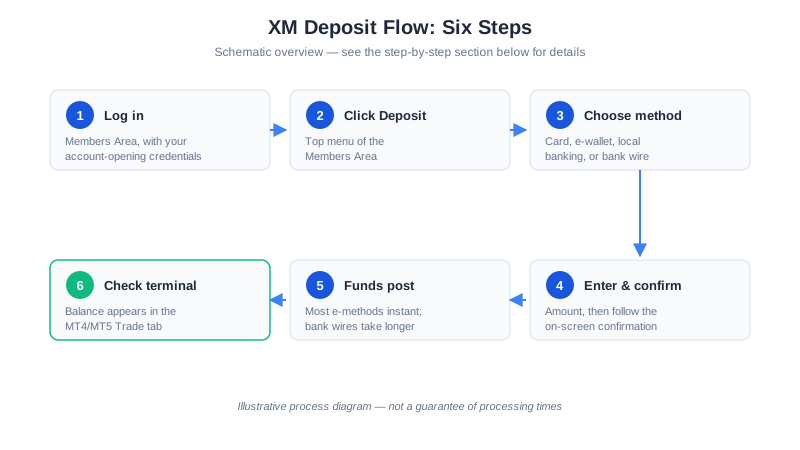
- Log in to the XM Members Area with the credentials from your account-opening email.
- Click “Deposit” in the top menu.
- Choose a payment method. Availability varies by country; the table below covers the common ones.
- Enter the amount and follow the on-screen confirmation.
- Wait for the funds to appear — most e-methods are instant; bank wires take longer.
- Check the MT4/MT5 terminal: your balance appears in the Trade tab once processed.
Payment Methods Compared
Figures as published by XM, July 2026:
| Method | Typical processing time | Deposit fees |
|---|---|---|
| Credit / debit card | Instant | None charged by XM |
| E-wallets (Skrill, Neteller, etc.) | Instant | None charged by XM |
| Local online banking (availability varies) | Minutes to hours | None charged by XM |
| International bank wire | 2–5 business days | Bank fees may apply; XM covers fees on larger wires |
Before You Fund: Three Things Not to Do
- Don’t fund with borrowed money. If a losing month means you can’t make a payment on it, the money was never risk capital.
- Don’t deposit money with a deadline attached. Funds you need back by a specific date turn a trading decision into a forced one.
- Don’t top up to rescue a drawdown. Adding capital specifically to keep a losing position or a stressed grid EA open treats a risk signal as a cash-flow problem instead of a decision point — if a position needs new capital to survive, that’s the moment to close it and reassess sizing, not fund it further. We’re an XM Introducing Broker and are paid when readers deposit and trade, so our incentive runs the opposite direction from this advice — we’re stating it anyway, because a rescued drawdown or a forced withdrawal is a worse outcome for you than a smaller account.
After the Deposit: Get the EA Trading
- Activate and download your free EA if you haven’t yet
- Install it on MetaTrader
- Run through the first-trade checklist — attach the EA, enable AutoTrading, confirm position sizing
Questions along the way? Ask in our Telegram channel.
Keep Learning
- Lot Sizes Explained — why $200 is the practical floor for sizing
- Forex Risk Management Guide — the math behind the balance table above
- GridMaster Setup Guide — the same $200 floor applied to grid trading
- Your EA’s First Trade Checklist — what to do once the account is funded
Affiliate Disclosure: Links to XM are affiliate links. We receive a commission at no cost to you. Full disclosure
Risk Warning: Trading forex/CFDs on margin carries a high level of risk and may not be suitable for all investors. You could lose some or all of your invested capital. Only deposit money you can afford to lose. Past performance is not indicative of future results.